Understanding libEnsemble
Manager, Workers, Generators, and Simulators
libEnsemble’s manager allocates work from generators to workers, which perform computations via simulators:
generator: Generates inputs for the simulator
simulator: Performs an evaluation using parameters from the generator
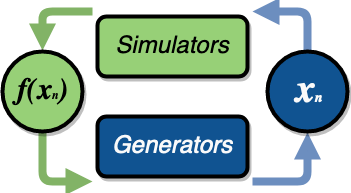
An executor interface is available so generators and simulators can launch and monitor external applications.
All simulations and generated values are recorded in a NumPy structured array called the history array.
Example Use Cases
Click Here for Use-Cases
A user wants to optimize a simulation calculation. The simulation may already be using parallel resources but not a large fraction of a computer. libEnsemble can coordinate concurrent evaluations of the simulator at multiple parameter values based on candidate parameter values produced by the generator (possibly after each simulator output).
A user has a generator that produces meshes for a simulator. Based on the simulator output, the generator can refine a mesh or produce a new mesh. libEnsemble ensures that generated meshes can be reused by multiple simulations without requiring data movement.
A user wants to evaluate a simulation with different sets of parameters, each drawn from a set of possible values. Some parameter values are known to cause the simulation to fail. libEnsemble can stop unresponsive evaluations and recover computational resources for future evaluations. The generator can update the sampling strategy after discovering regions where evaluations of the simulator fail.
A user has a simulation that requires calculating multiple expensive quantities, some of which depend on other quantities. The simulator can monitor intermediate quantities to stop related calculations early and preempt future calculations associated with poor parameter values.
A user has a simulation with multiple fidelities, where higher-fidelity evaluations require more computational resources. The generator and allocator decide which parameters should be evaluated and at what fidelity level. libEnsemble coordinates these evaluations without requiring the user to write parallel code.
A user wishes to identify multiple local optima for a simulation. In addition, sensitivity analysis is desired at each identified optimum. libEnsemble can use points from the APOSMM generator to identify optima. After a point is determined to be an optimum, a different generator can generate the parameter sets required for sensitivity analysis of the simulation.
Combinations of these use cases are also supported.
Glossary
Click Here for Glossary
Manager: A single libEnsemble process that facilitates communication between other processes. The Manager configures and distributes work to workers and collects their output.
Worker: libEnsemble processes responsible for performing units of work, which may include executing tasks or submitting external jobs. Workers typically run simulators and return results to the manager.
Executor: A simple, portable interface for launching and managing tasks (applications). Multiple executors are available, including the base
ExecutorandMPIExecutor.Submit: A submitted task is either executed immediately or queued for execution.
Tasks: Subprocesses or independent units of work. Tasks result from launching external programs for execution using the Executor.
Resource Manager: libEnsemble module that detects (or is provided with) available resources (e.g., a list of nodes). Resource sets are divided among workers and can be dynamically reassigned.
Resource Set: The smallest unit of resources that can be assigned (and dynamically reassigned) to workers. By default this is the provisioned resources divided by the number of workers. It can also be set explicitly using the
num_resource_setslibE_specsoption.Slot: Resource sets enumerated on a node (starting from zero). If a resource set spans multiple nodes, each node is considered to have slot zero.